How to use this tool
- Print or display the sample QR on another device.
- Start the camera and grant permission if you choose.
- Move the code into view and compare different distances or lighting.
- Read the decoded text, then stop camera access.
 GEARCHECK LAB
Use your camera to scan a known QR code and see whether the browser can decode it. Decoded text stays on the page and links are never opened automatically.
READY — choose an action below
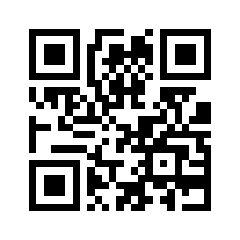
Sample text: GearCheckLab QR test
No code decoded.
No measurement yet.
The first successful decode establishes that the current camera image and browser decoder could read that code under these conditions. Time to first decode starts at the first usable video frame and includes the time you take to position the code. It is not camera autofocus latency. The sample encodes harmless plain text rather than a web address. Use a second device or paper because a front-facing camera cannot see its own screen. Treat unknown QR content as untrusted and inspect it yourself.
BarcodeDetector is not supported by every browser. Unsupported decoding is shown before camera permission is requested, with no false camera failure. This does not verify whether a QR destination is safe, and it never navigates to scanned URLs. Hiding the page or Stop releases the camera. Frames and decoded content are not uploaded.
Device previews, recordings, selected files and report notes stay in your browser. Downloaded files remain on your device. The call check sends small HTTP probes to GearCheck Lab. The WebRTC test exchanges temporary connection descriptions through our server and contacts the disclosed STUN service only after you create or join a session. Ordinary page requests and usage measurement are described in our privacy policy.